
Integration patterns in Oracle Integration 3: choosing the trigger
What starts an integration determines how a delay is detected, how a duplicate is prevented and how a failure is recovered. Criteria for choosing between Application, Event and Schedule in Oracle Integration 3.
The mechanism that starts an integration determines how it behaves when the source is late or the target fails. An order sent by an application, a nightly extraction and a file delivered by a partner may all end up in the same system, yet each requires different controls for availability, duplicates and recovery.
This article describes the integration styles in Oracle Integration 3 (OIC), explains what each one decides and proposes criteria for choosing between them. It closes with a decision sheet that applies to any new integration. The examples are illustrative.
Trigger and data format
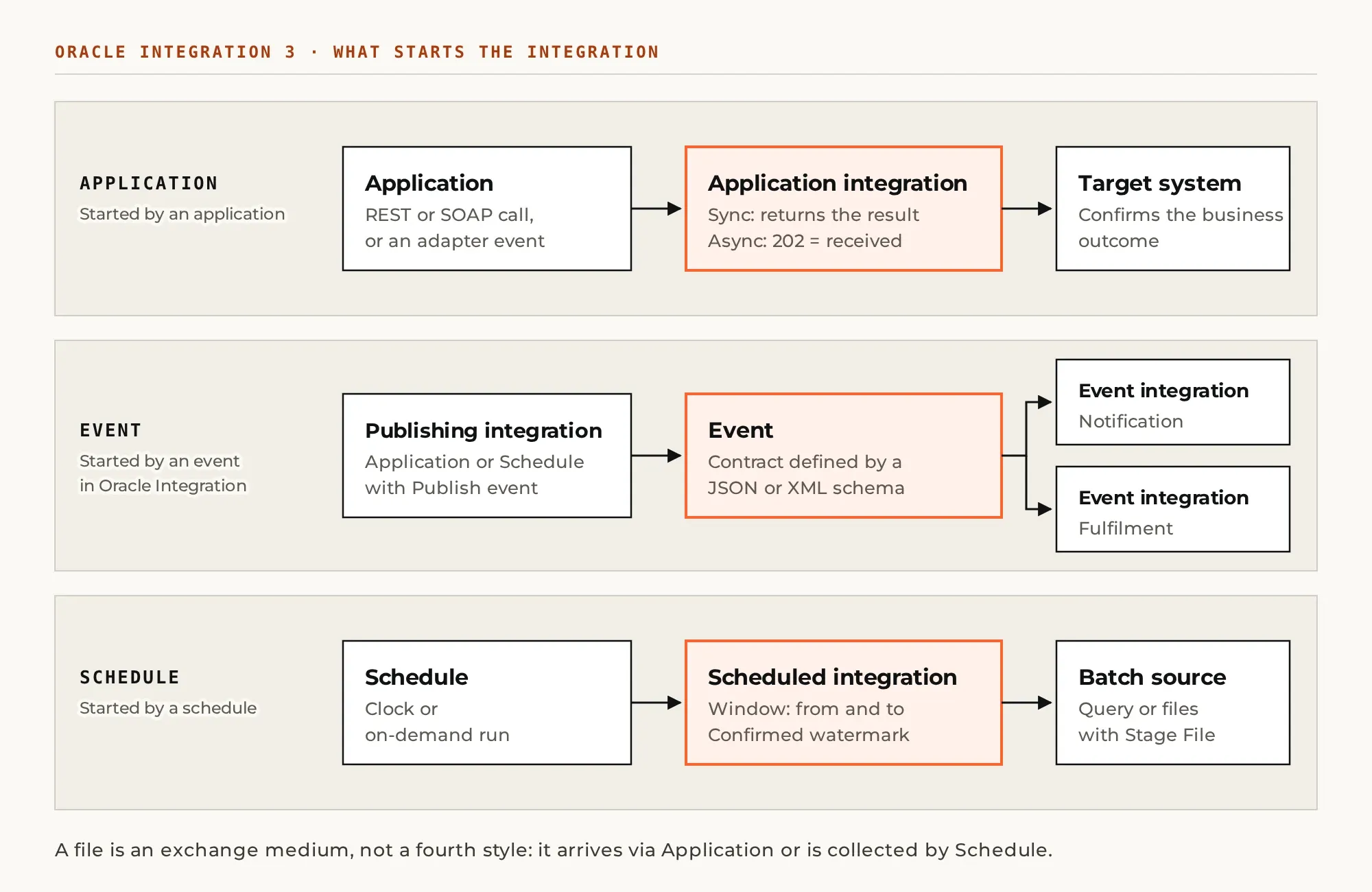
Oracle Integration 3 classifies integrations into three styles: Application, Schedule and Event. According to the integration styles guide, the classification criterion is what starts the run: an application, a schedule or an event published by another integration.
A file is not a fourth style. It is an exchange medium that can be collected by a scheduled integration or received through an application interface, depending on the adapter's capabilities. Confusing the format with the trigger is a common source of designs that are hard to operate.
Before designing the flow, three elements should be written down: what it means for the data to be ready for processing, who signals that readiness and what evidence remains if the signal fails. That definition separates the arrival of a document from the confirmation that the business process has finished.
Application integrations: synchronous and asynchronous calls
An Application integration starts from an application trigger and can be synchronous or asynchronous. The application integrations documentation ties that choice to one question: whether the caller needs to wait for the result of the work.
An availability lookup during an interactive transaction suits a synchronous response, provided the full path fits within the allowed time. Registering a request whose processing continues after acceptance calls instead for an asynchronous interface and a separate status or notification mechanism.
In an asynchronous REST trigger, HTTP 202 means receipt, not outcome. Oracle documents that difference in its comparison of synchronous and asynchronous execution. The consumer therefore needs an explicit contract to learn the final result.
That contract includes an operation identifier, the possible states and an owner for pending requests. The identifier also serves a second purpose: if the consumer resends the order because no response arrived, it allows the system to recognize the same work. Duplicate protection depends on that design and on the capabilities of the target.
Event integrations: facts published inside OIC
Two situations are often confused. An external application can emit an event through its adapter and trigger an Application integration. An Event integration, by contrast, subscribes to an event defined and published inside Oracle Integration.
In the second mechanism, the event contract is defined with a JSON or XML schema. A publishing integration, of the Application or Schedule style, uses the Publish event action, and one or more Event integrations subscribe. Oracle describes the model and header filters in About Event Integrations.
The pattern fits when several processes must react to the same fact without the publisher coordinating each run. An illustrative example: an «order approved» event feeds a notification and a fulfilment process, each with the data it needs.
Schema governance is the condition for success. There must be an owner for its changes and a compatibility rule. As a criterion, the event should carry a stable reference to the business object rather than a full copy of the record. Each subscriber's behavior when it fails while the others continue should also be tested.
Schedule integrations: windows and watermarks
The Schedule style starts from a schedule instead of a trigger adapter, and supports on-demand runs, according to the scheduled integrations guide. It corresponds to systems that expose query-based extraction or exchange batches at agreed times.
Its condition of use is twofold: the business can wait until the next window, and there is a verifiable way to delimit what is pending. Extracting modified documents requires defining the start and end of the queried interval and the moment progress is confirmed. A query for «everything changed since the previous run» is ambiguous if that run did not complete.
We recommend tying the watermark to confirmed work rather than to the time the integration started. Two further rules are needed: how late-arriving records are treated and what happens when two runs try to process the same period. The specific rule depends on the query mechanism and on the guarantees of the source.
The schedule's time zone deserves its own check. When windows involve teams in Central America and the United States, daylight saving changes shift the agreed times. Manual runs should also be tested to confirm they do not alter the state used by the regular schedule.
Files: batches with identity and evidence
To process downloaded files, Oracle Integration provides the Stage File action, which reads them whole or in segments depending on the operation and format. The file processing guide documents its constraints. Files created by this action are visible only within their scope and are deleted when the scope ends.
A requirement follows from that behavior: when the process may need reprocessing, originals and evidence must be kept in durable storage. The Stage File temporary area is not an archive. Each batch needs an identity and a verifiable link between its records and the operations applied in the target.
The sender and receiver should agree on how a complete file is recognized before it is read, using a protocol both systems can honor. Structural and business-rule validation precedes batch confirmation. If some records are accepted and others rejected, the result must allow correcting only what is pending, without resending what was already confirmed.
Segmented reading helps with large files, but it does not turn the batch into a transaction. The design must record progress and define the response to a failure in the middle of the file. Size limits should be taken from the current adapter and service documentation.
Decision sheet and acceptance test
We recommend documenting each integration in a short sheet with the chosen trigger and its rationale. The sheet supports the technical review and the handover to the team that will handle incidents.
- Application: a call or a change in an application starts the work and the adapter supports it.
- Event: the work responds to an event published by another Oracle Integration integration.
- Schedule: a schedule or an on-demand run starts an extraction or a batch.
- Files: batch identity, a completeness criterion and evidence of acceptance per record or per batch.
- In every case: a rule for recognizing duplicates and an owner who confirms the final result.
The acceptance test should include a failure injected after a successful write, to observe what the second attempt does. The operator must be able to locate the business object and distinguish receipt, processing and confirmation. An integration is ready to operate when those three phases are observable and the recovery procedure has been executed at least once.
At Xterra Engine we review integration sheets like this before construction, while changing the trigger still carries no rework cost.