
Java: Security Alert CVE-2026-91403 (JSSE, 9.1) and Oracle's October 2026 Critical Patch Update
One day after the October quarterly patch, Oracle and OpenJDK published CVE-2026-91403: Java trusts eMudhra's compromised intermediates. Affected versions, which certificate store each JDK uses and how to fix it.

On 20 October 2026 Oracle released its quarterly Critical Patch Update (CPU), with 55 fixes for Java SE. The next day, Oracle and the OpenJDK vulnerability group published an out-of-band alert, CVE-2026-91403, scored 9.1 on CVSS 3.1: the newly released versions still trust the eight compromised intermediate certificates of the eMudhra certificate authority. This article explains what that means, how to tell which certificate store each Java installation uses, and which fixes OpenJDK documents.
An explanation for readers who do not run servers
Java sits behind much of enterprise software: banking systems, ERPs, application servers, integrations and the build tooling of Android apps. When a Java program connects to another system over HTTPS, it decides whether to trust it by checking a list of certificate authorities included in the Java installation itself.
That list still includes intermediate authorities whose keys leaked. Until it is fixed, someone with access to the network in between could present a forged certificate and impersonate a bank, a supplier or an API, and the Java program would accept it. That is why the alert is critical even though it is not a programming error in Java.
What CVE-2026-91403 is
Oracle's alert places the vulnerability in JSSE (Java Secure Socket Extension), the component that implements TLS, and scores it 9.1: network-exploitable, without authentication or user interaction, with high impact on confidentiality and integrity. The OpenJDK advisory states the cause: eight compromised intermediate CA certificates.
The affected versions are the latest of each line: Java SE 8u511, 11.0.33, 17.0.21, 21.0.13, 25.0.5 and 27.0.1, plus GraalVM for JDK 17.0.21 and 21.0.13 and GraalVM Enterprise 21.3.20. OpenJDK lists 8u512 and all earlier versions. Oracle warns that unsupported versions were not tested but are likely affected as well.
Which certificate store each Java uses
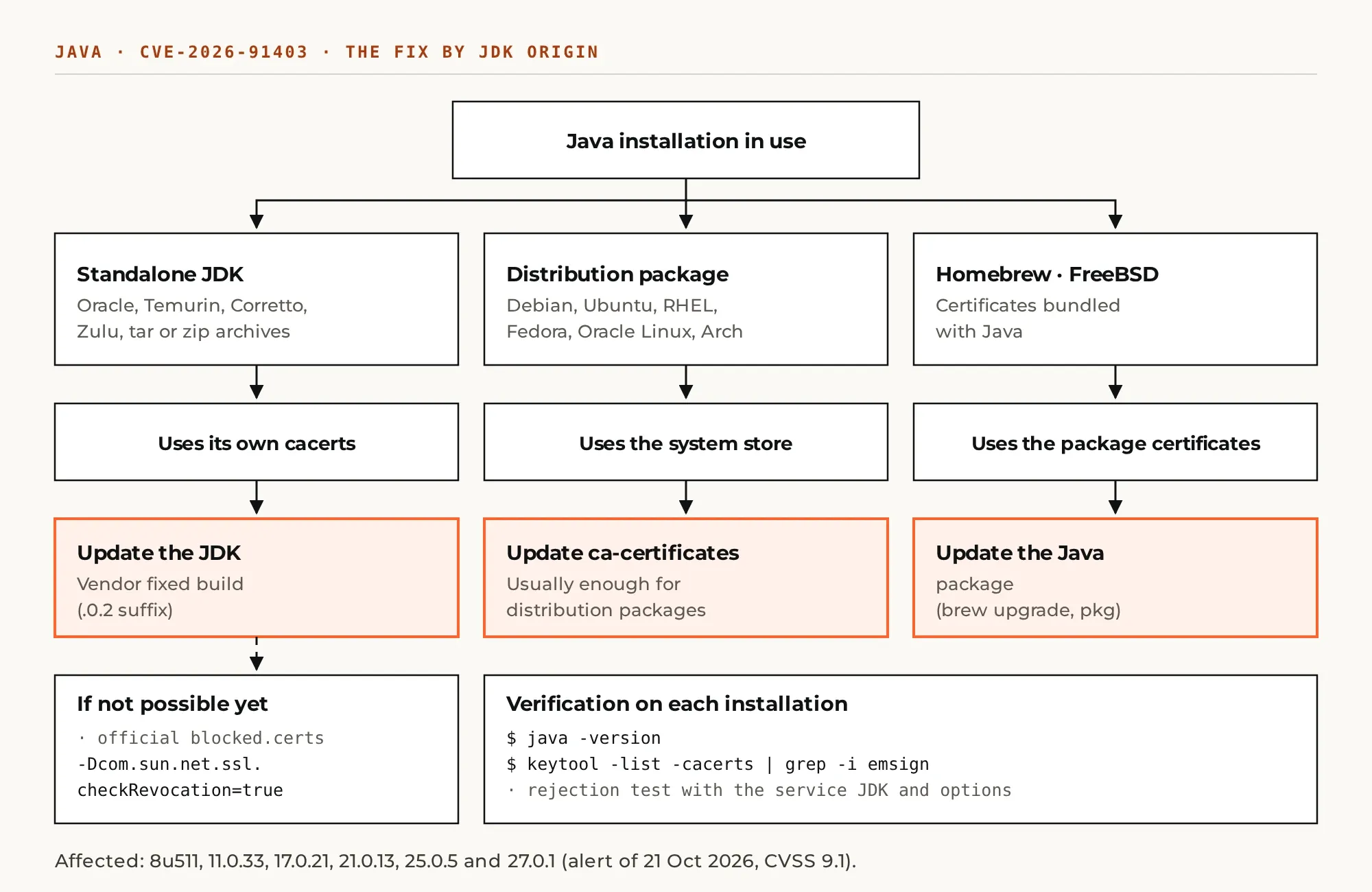
The fix depends on where each installation takes its list of authorities from. OpenJDK distinguishes two cases, and an independent test published on lilting.ch confirms them:
- Standalone JDK (Oracle, Temurin, Corretto, Zulu, .tar or .zip archives): uses its own
cacertsfile inside the installation. It needs the vendor's fixed build or the manual block. - OpenJDK packaged by the distribution (Debian, Ubuntu, Fedora, RHEL, Oracle Linux, Arch, Gentoo): usually relies on the operating system store. Updating
ca-certificatesis usually enough. - Homebrew and FreeBSD: bundle the certificates with Java; the Java package itself must be updated.
Fix and interim measures
OpenJDK recommends updating standalone JDKs as soon as possible. Sources report the builds with a .0.2 suffix (for example, 21.0.13 and 25.0.5 with that suffix) as fixed; confirm it in each vendor's release notes. If updating immediately is not possible, OpenJDK documents two measures:
- Replace
blocked.certs: download the official file for your operating system and replace$JDK_HOME/lib/security/blocked.certs, keeping any custom entries. On JDK 8 the file is namedblacklisted.certs. - Enable revocation checking: add
-Dcom.sun.net.ssl.checkRevocation=trueand-Dcom.sun.security.enableCRLDP=trueat startup. The lilting.ch test confirms Java then rejects the chain withCertificateRevokedException; in exchange, connections depend on revocation lists being reachable.
Both measures apply per installation: a server with several JDKs needs them in each one. Because two of the intermediates signed code, on JDK 17 or later verify signed JARs with jarsigner -verify -revcheck -strict.
The 20 October quarterly patch
The October 2026 CPU fixes 1,209 CVEs across 33 Oracle product families; for Java SE it includes 55 patches, 49 of them remotely exploitable without authentication, according to Tenable's summary. Oracle identified no active exploitation of those flaws, but its advisory notes reports of successful attacks against already-patched vulnerabilities at customers who had not applied the patches. Oracle's next security release is scheduled for 17 November 2026.
Verification procedure
- Inventory every Java installation, including those bundled inside third-party products (application servers, CI tools, agents).
- Get the exact version with
java -versionfrom the path each service uses, not the user'sPATH. - Determine whether it uses its own
cacertsor the system's: a standalone JDK has it at$JAVA_HOME/lib/security/cacertsas a real file; distribution packages usually link to the system store. - List the suspect authorities:
keytool -list -cacerts | grep -i emsign. - Test rejection against the incident's test servers (
emudhra.we-have-a-problem.com) with the same JDK and options as the service: the connection must fail.
Frequently asked questions
We just applied the October CPU. Are we covered?
Not necessarily. The versions released in the 20 October CPU are precisely the ones the 21 October alert declares affected. You need the later build or one of the interim measures.
Can I just delete the emSign root from cacerts?
It reduces risk for the eMudhra chain, but not for the cross-certificates signed by the Sectigo root. OpenJDK recommends the official blocked.certs file or the update, which cover both paths.
Sources
- Oracle, Security Alert CVE-2026-91403.
- OpenJDK, Vulnerability Advisory 2026/10/21.
- Oracle, October 2026 Critical Patch Update.
- Tenable, CPU summary.
- lilting.ch, test on OpenJDK and Temurin.
- Incident background: eMudhra certificate compromise.
Support with Java and Oracle products
Xterra Engine patches Java on application servers and integrations, verifies the trust store of each installation and plans the migration of unsupported versions. To request support or a quote, write to info@xterraengine.com or use the contact form.